
Direct mail attribution connects each mailing to the calls, booked jobs, and revenue it produced, using tracking numbers, QR codes, and a matchback of mailed addresses against your CRM. For contractors, the result is a cost per booked job for every campaign instead of a guess.
If you run an HVAC, plumbing, roofing, electrical, or garage door company, that is the only mail report worth reading: every campaign tracked to booked jobs and revenue. Pieces dropped is not a result. Jobs on the schedule and paid invoices are.
Below: what attribution is, how matchback works, three methods compared, a fair attribution window, the ROI math, and the mistakes that skew reports.
What is direct mail attribution?
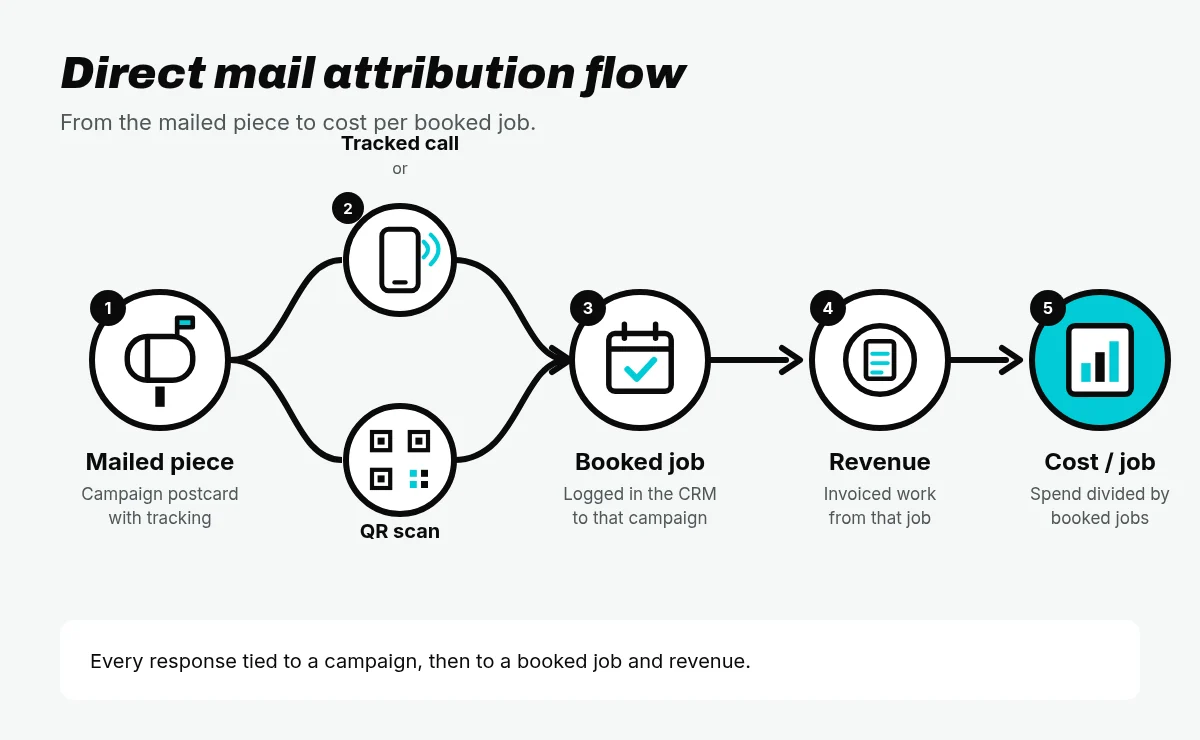
Direct mail attribution is the process of connecting each mailing to the calls, booked jobs, and revenue it produced. It answers one question: what did this campaign book?
Most mail reports stop at activity. How many pieces went out. Maybe how many calls came in. That tells you the mail was delivered. It does not tell you whether it paid.
Attribution goes further. Tracking captures the response, like a call to the number on the card or a QR scan. Attribution assigns credit for that response to a specific campaign and drop, follows it to a booked job and an invoice, and rolls it up into cost per booked job.
Here is the difference in practice:
- Activity report: pieces mailed, calls received.
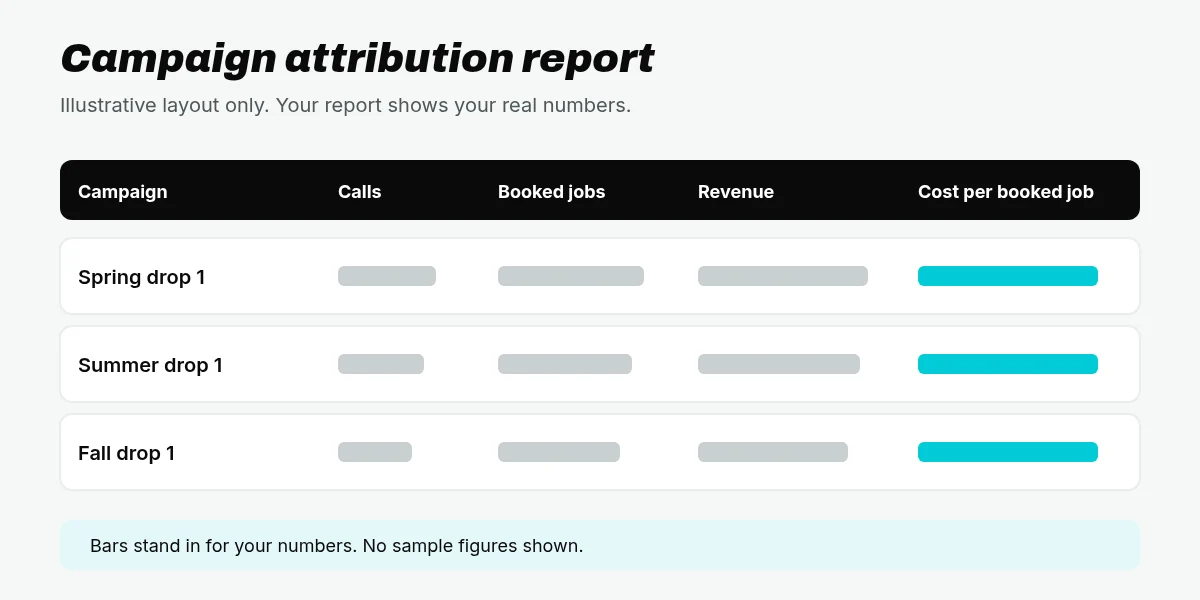
- Attribution report: pieces mailed, calls, booked jobs, revenue, and cost per booked job, by campaign and drop.
The second report tells you what to mail again.
Attribution starts with tracked calls and QR codes. If you need that setup first, start with how to track direct mail. This post assumes those are in place and spends its time on what comes after: matchback, methods, windows, and the math.
What is a matchback report?
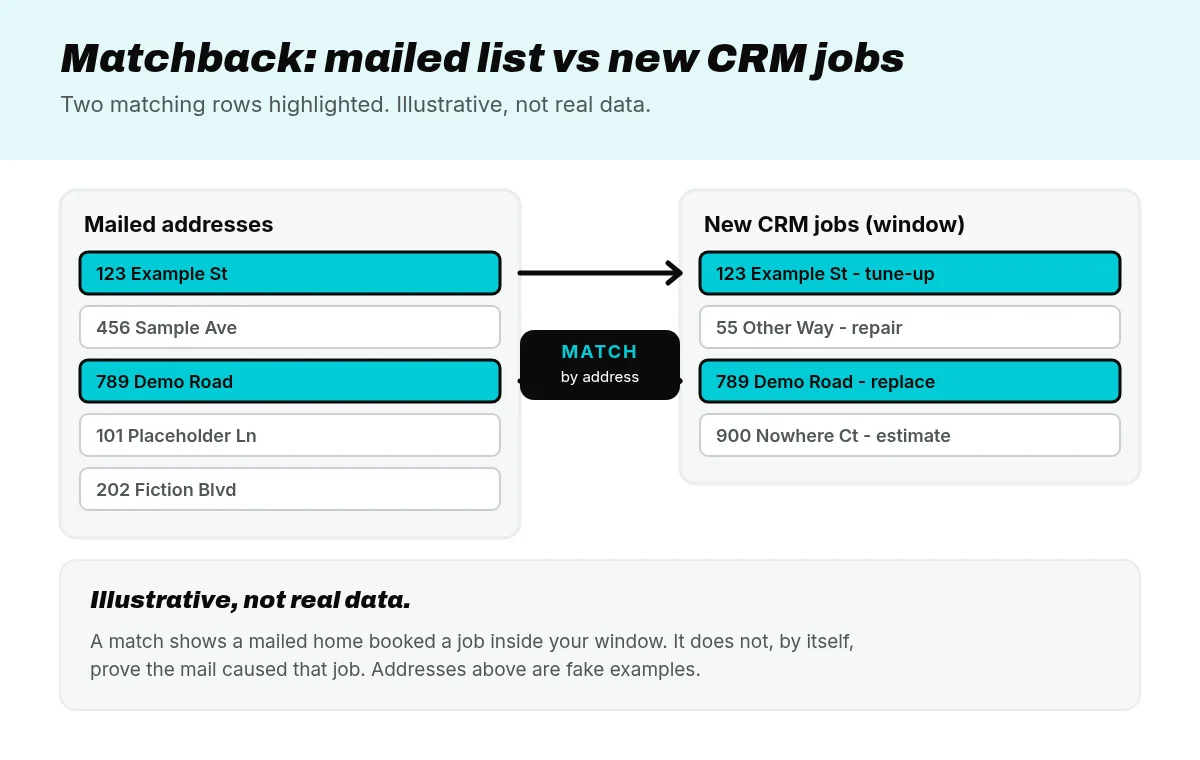
A matchback report compares the list of addresses you mailed with the new jobs in your CRM during a set window after the mail lands. When a new job shows up at an address you mailed, that is a match.

Here is how a matchback works in plain terms:
- Start with the mailed address list for one campaign and drop.
- Pull new jobs from your CRM, such as ServiceTitan or Housecall Pro, booked inside your attribution window.
- Match on the service address. Where the data is clean, name and phone number help confirm the match.
- Count the matches, then add up the booked jobs and revenue tied to them.
What a match shows, and what it does not
A match shows that a home you mailed booked a job inside your window. It does not, by itself, prove the mail caused that job.
Some of those homeowners would have called you anyway. A furnace died, or a neighbor recommended you. That is correlation, not causation. A matchback is still worth running because it shows the full footprint of a campaign. Read it honestly, and pair it with the methods below.
Why matchback matters for contractors who call the main line
Homeowners do not always use the number on the card. They keep your magnet on the fridge. They see your truck in the neighborhood. They search your company name and tap the number on your Google profile.
None of those calls hit the campaign tracking number. Without a matchback, every one of those jobs is missing from the campaign report, and the mail looks weaker than it is. Matchback is how those jobs still land in the report, as long as the address was on the mailed list.
Three attribution methods compared
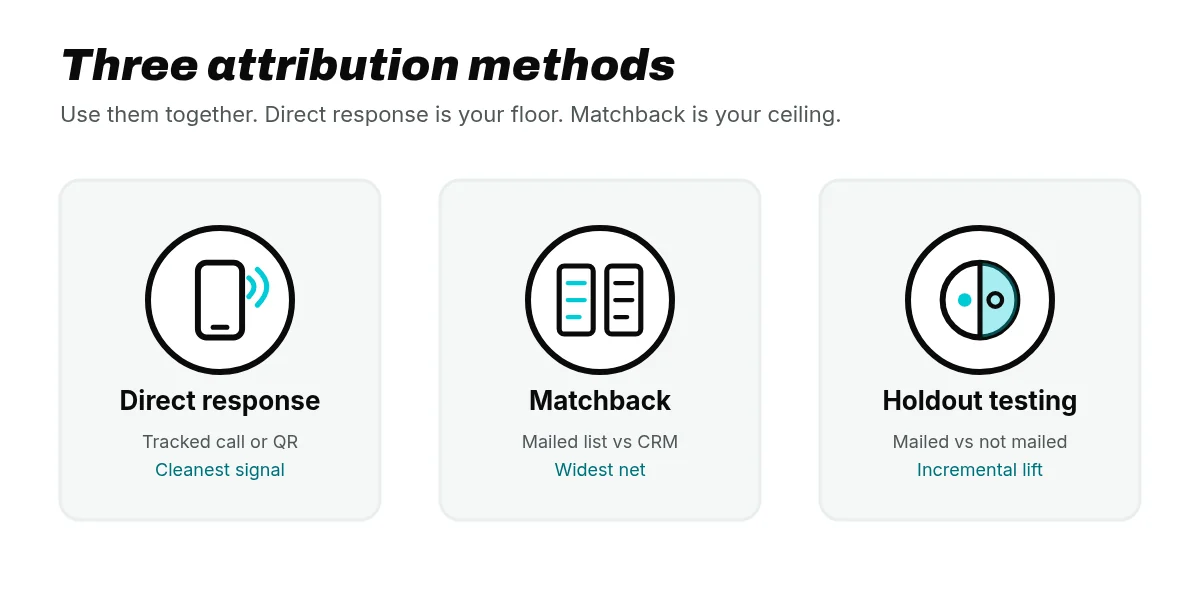
Each of the three common methods catches something the others miss.
| Method | What it catches | What it misses |
|---|---|---|
| Direct response (unique call tracking number, QR code) | Callers and scanners who use the piece | People who call the main line or never scan |
| Matchback | New jobs at mailed addresses in the window | Does not prove mail caused the job by itself |
| Holdout or control group | Incremental lift versus homes not mailed | Needs enough volume and a clean holdout; harder for small lists |
Direct response: the cleanest signal
A call to a tracking number unique to the campaign, or a scan of the campaign QR code, is the strongest evidence you have. The homeowner had the piece in hand and acted on it. The limit is coverage. It only counts people who use the piece the way you designed it.
Matchback: the widest net
Matchback catches the jobs that came in through the side door: the main line, the truck, the search. The limit is proof. A match is a mailed home that booked, not a confirmed mail response.
Holdout: the honest test
A holdout, or control group, is a set of homes from your target list that you deliberately do not mail. After the window closes, you compare how often mailed homes booked with how often the held-out homes booked. The difference is the incremental lift: the jobs the mail added beyond what would have happened anyway.
A holdout needs enough homes in both groups, and the two groups need to be alike, to give a clear read. That makes it harder for small lists. For larger programs, it is the best answer to “would they have called anyway?”
Use the methods together
Treat direct response as your floor and matchback as your ceiling. The real number of jobs the mail drove sits somewhere between them. A holdout, when you have the volume, tells you where.
First-touch, last-touch, and multi-touch
A homeowner gets your postcard, searches your name, then calls. First-touch credits the mail. Last-touch credits the search. Multi-touch splits the credit. For a mail program, pick one rule, write it down, and apply it the same way every campaign.
How long is a fair attribution window?
The attribution window is the period after a drop during which a new call or job counts toward that campaign. Too short, and you miss jobs the mail earned. Too long, and you credit the mail for work it had nothing to do with.
There is no single right length for every trade. A water heater replacement and a roof replacement do not have the same sales cycle. What matters most is that you set the window on purpose:
- Set it before you read results. Deciding after you see the numbers is how reports get bent.
- Fit it to your sales cycle. Emergency repairs book fast. Replacements and bigger projects can take longer from first call to signed job.
- Keep it the same campaign to campaign. Otherwise you cannot compare one drop with the next.
Start the clock when mail reaches homes
Start the window when the mail reaches homes, not when it leaves the printer. USPS Marketing Mail may receive deferred handling, and USPS does not guarantee its delivery within a specified time (USPS Domestic Mail Manual 243, section 3.1.1). Start on the mail date and you shrink the real window.
A better start signal is USPS mail tracking data. Informed Visibility Mail Tracking and Reporting provides near real-time tracking data for domestic-bound letters and flats (USPS PostalPro). When that data is available for a drop, use it to set the start date for that drop’s window.
How do you calculate direct mail ROI from attribution?
Once attribution gives you booked jobs and revenue for each campaign, the math is short. Three numbers matter.
Cost per booked job = campaign spend divided by booked jobs traced to the mail.
ROAS (return on ad spend) = revenue traced to the campaign divided by mail spend.
Direct mail ROI = revenue traced to the campaign, minus campaign spend, divided by campaign spend.
ROAS tells you how much revenue each unit of mail spend brought back. ROI tells you whether the mail returned more than it cost. If you track job margins, run the ROI formula with gross profit instead of revenue for a stricter read.
Why cost per booked job is the number to manage
Cost per piece tells you what you paid. Cost per booked job tells you what you got. A piece that costs less but books nothing is the most expensive mail you can send.
Use cost per booked job to make the call on every campaign:
- Compare it across campaigns, drops, and lists. The winners are obvious once they sit side by side.
- Compare it with what a booked job is worth to you, by trade and job type. A replacement job can carry a higher cost per booked job than a tune-up and still win.
- Put the next budget where it is lowest for the work you want more of.
Count spend fully: printing, postage, list, design, and tracking. Count revenue honestly: invoiced jobs inside the window, under the credit rule you set. That is direct mail return on investment you can defend.
Common attribution mistakes
- Counting every job in the mailed area. A new job in the same ZIP code or radius is not a match. Match on the addresses you actually mailed. Even with radius marketing, the mailed address list is the source of truth.
- Ignoring existing customers. Repeat customers on the mailed list may book on their own schedule. Tag new versus existing customers in your CRM and report them separately.
- Moving the window after the fact. No fixed window, or a window changed after you see results, makes every report unreliable.
- Stopping at response rate. Calls are not jobs. If the report ends at calls, you are grading the mail on activity, not booked jobs and revenue.
- One tracking number across campaigns. A shared number blurs credit between drops. Give each campaign and drop its own call tracking number.
- Dirty CRM data. Misspelled streets, missing unit numbers, and blank lead-source fields break matches. Clean addresses and a required lead-source field fix most of it.
- Counting the same job twice. A tracked call and a matchback match can be the same job. Count each job once.
How Mail Wins reports attribution
At Mail Wins, every campaign is tracked to booked jobs and revenue. Here is what our direct mail attribution covers:
- Every piece gets a tracked call number unique to the campaign and drop.
- QR codes, where they fit the piece, log scans to the same campaign.
- Calls are matched to booked jobs and revenue in your CRM. We integrate with ServiceTitan and Housecall Pro, and other CRMs where available.
- You get a report and a dashboard login by campaign and drop: calls, booked jobs, revenue, cost per booked job, and ROAS.
We also match the addresses we mailed against new jobs in your CRM, so jobs from homeowners who called your main line still count toward the campaign. Your Mail Wins dashboard shows which drop made the phone ring, whether those calls booked, and what to mail again. ROAS there is revenue divided by mail spend, the same formula above.
Tracking comes standard. Every Mail Wins direct mail program includes tracked call numbers, lead tracking, the report, and a dashboard login.
Tracking and optimizing is the last of four steps in how it works, after analyze and strategize, target and design, and print and deliver. What we need from you is access to match calls to booked jobs and revenue in your CRM.
Whether you run HVAC direct mail or direct mail for plumbers, the report reads the same way: booked jobs, revenue, and cost per booked job by campaign. For process questions, see the direct mail FAQ.
Direct mail attribution FAQ
Is matchback accurate?
Matchback is as accurate as your address data and your attribution window. It shows that a mailed home booked a job. It does not, by itself, prove the mail caused that job. Use it alongside tracked calls and QR scans, keep the addresses in your CRM clean, and keep the same window every campaign.
Does attribution count customers who call the main number?
Direct-response tracking misses them, because they never dialed the call tracking number. A matchback can still catch them: a new job at a mailed address counts toward the campaign even when the homeowner called your main line. That is why Mail Wins uses both tracked call numbers and a CRM matchback of your mailed addresses.
What CRM data do you need?
You need clean service addresses on new jobs, plus a way to tie calls to customer and job records. A lead-source field and a tag for new versus existing customers help. Mail Wins integrates with ServiceTitan and Housecall Pro, and other CRMs where available. Confirm your CRM during your consultation.
Is attribution included with Mail Wins?
Yes. Tracking and reporting to booked jobs and revenue come standard with every Mail Wins direct mail program. That includes tracked call numbers, QR codes where they fit the piece, lead tracking, a report by campaign and drop, and a login to your Mail Wins dashboard.