
To track direct mail, give every mailing its own call tracking number and QR code, then match the calls and visits to booked jobs and invoices in your CRM. That turns “we sent postcards” into a report of calls, booked jobs, and revenue per campaign.
If you have mailed before and could not tell what worked, this is for you. Below is how we measure direct mail marketing for HVAC and plumbing contractors, step by step, plus what to do about the calls that slip through.
How do you track direct mail?
You track direct mail by giving each campaign a way to be counted, then following each response all the way to a booked job and an invoice. Pieces dropped is not a result. Booked jobs and revenue are.
Here is the process in five steps:
- Give each campaign its own phone number. A call tracking number unique to the campaign and drop.
- Add a QR code and landing page per campaign. So scans and site visits count too.
- Record every call and tag it. Booked or not booked, and why.
- Match responses to booked jobs in your CRM. Including the people who call your main line.
- Report revenue and cost per booked job by campaign. So you know what to mail again.
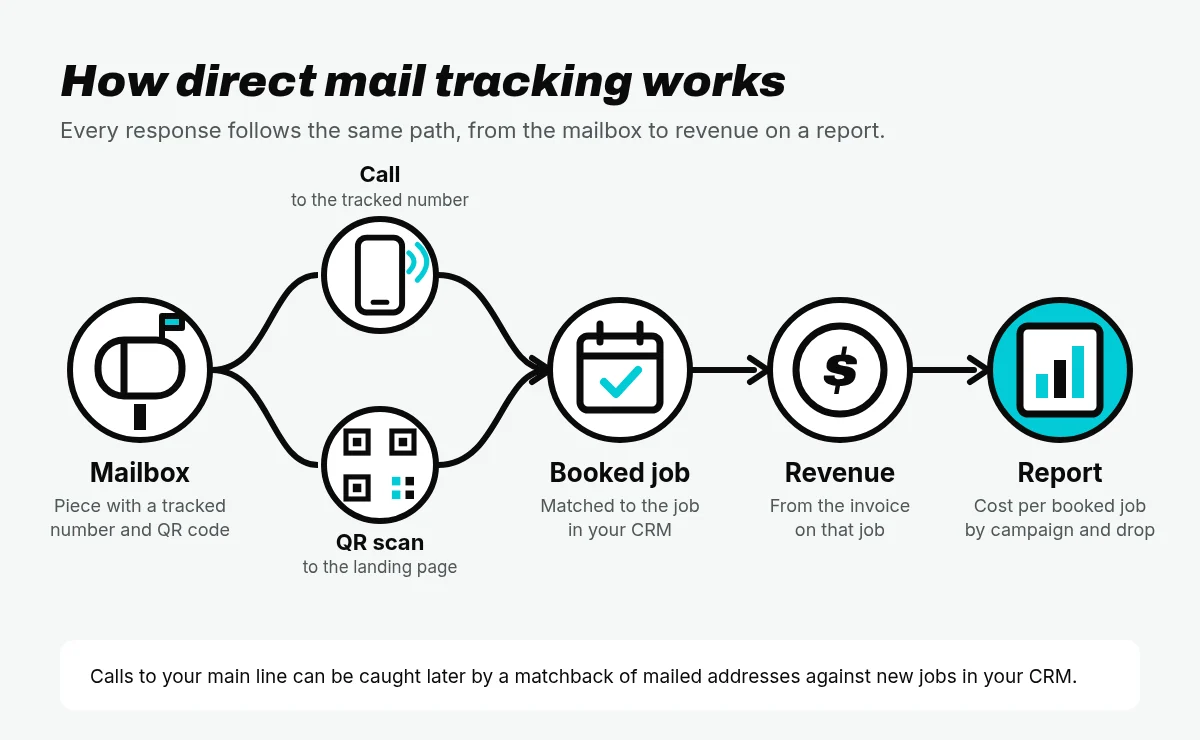
Each step closes a gap the step before it leaves open. Skip one and part of your results goes missing. The sections below cover each step, then the questions contractors ask most about direct mail analytics.
Step 1: Give each campaign its own phone number
A call tracking number is a phone number that forwards to your office line and logs every call: when it came in, how long it lasted, and which number was dialed. Put a different number on each campaign, and every call tells you which mailing it came from.

Why one shared number hides results
If your postcards, your trucks, your website, and your Google profile all show the same number, every call looks the same. You can see the phone ringing more after a drop, but you cannot prove which mailing did it, and you cannot compare two mailings.
The same is true inside your mail. If a new mover postcard and a tune-up reminder share one number, you will never know which one booked the work. That is why every piece should get a tracked call number unique to the campaign and drop.
Where the number goes on the piece
- Make it the only number on the piece. If your main line is printed too, some people will call it and the call will not count.
- Put it next to the offer. The number should sit where the eye lands after reading the offer, on the side with the call to action.
- Make it easy to read at a glance. Large, clear digits, with nothing crowding them.
- Repeat it on the landing page. People who scan the QR code and then decide to call should reach the same campaign number.
Step 2: Add a QR code and landing page per campaign
Some people pick up the phone. Others want to look you up first. A QR code catches the second group.
Give each campaign its own QR code that opens a landing page built for that offer. Add UTM parameters to the link the QR code opens. UTM tags are short labels added to the end of a web address, such as utm_source, utm_medium, and utm_campaign, that tell your analytics where a visit came from (Google Analytics Help).
Illustrative format only: yoursite.com/tune-up/?utm_source=mail&utm_medium=postcard&utm_campaign=fall-tuneup-drop1
Use the same naming every time, in lowercase, so campaigns do not split into separate rows in your reports. Google notes that UTM values are case sensitive (Google Analytics Help).
What to do when people type the URL instead of scanning. Some people will type your web address instead of scanning. Plan for it:
- Print a short, easy web address for the campaign that redirects to the tagged landing page.
- Put the campaign tracking number on that landing page, so a visit that turns into a call still counts.
- If you add an offer code to the piece, ask for it on the landing page form.
QR code postcards are not a replacement for the phone number. They are a second door into the same campaign. Treat the tracked call number and the QR code as one campaign: same offer, same drop, same report row.
Step 3: Record every call and tag it
A call is not a booked job. Reviewing calls lets you hear what actually happened: a new customer asking for service, an existing customer, a wrong number, or a vendor.
Tag every call from a tracking number with at least two things:
- Booked or not booked. Did the call end with a job on the schedule?
- Why not, if not booked. Out of area, price shopping, no availability, wrong number, existing customer calling about another job.
The “why not” tags are often where the money is. If mail calls are coming in but not booking because the schedule is full, that is a capacity problem, not a mail problem. If they are not booking because the offer confuses people, that is a fix for the next drop.
If you record calls, follow the consent laws that apply where you operate and where your callers are.
Step 4: Match responses to booked jobs in your CRM
Calls and scans show interest. Booked jobs and invoices show results. The next step is to connect the two in the system you already run your business on, such as ServiceTitan or Housecall Pro.
Match tracked calls to jobs. For each call from a tracking number, find the customer and job record in your CRM by phone number, name, and service address. If a job was booked and invoiced, you now have revenue tied to a specific campaign and drop.
Catch the calls that went to your main line. Not everyone uses the number on the card. Some people keep your magnet, search your name, or call the number on your truck. A matchback can catch them. You compare the list of addresses you mailed against new jobs in your CRM during a set window after the drop. A new job at a mailed address is a match.
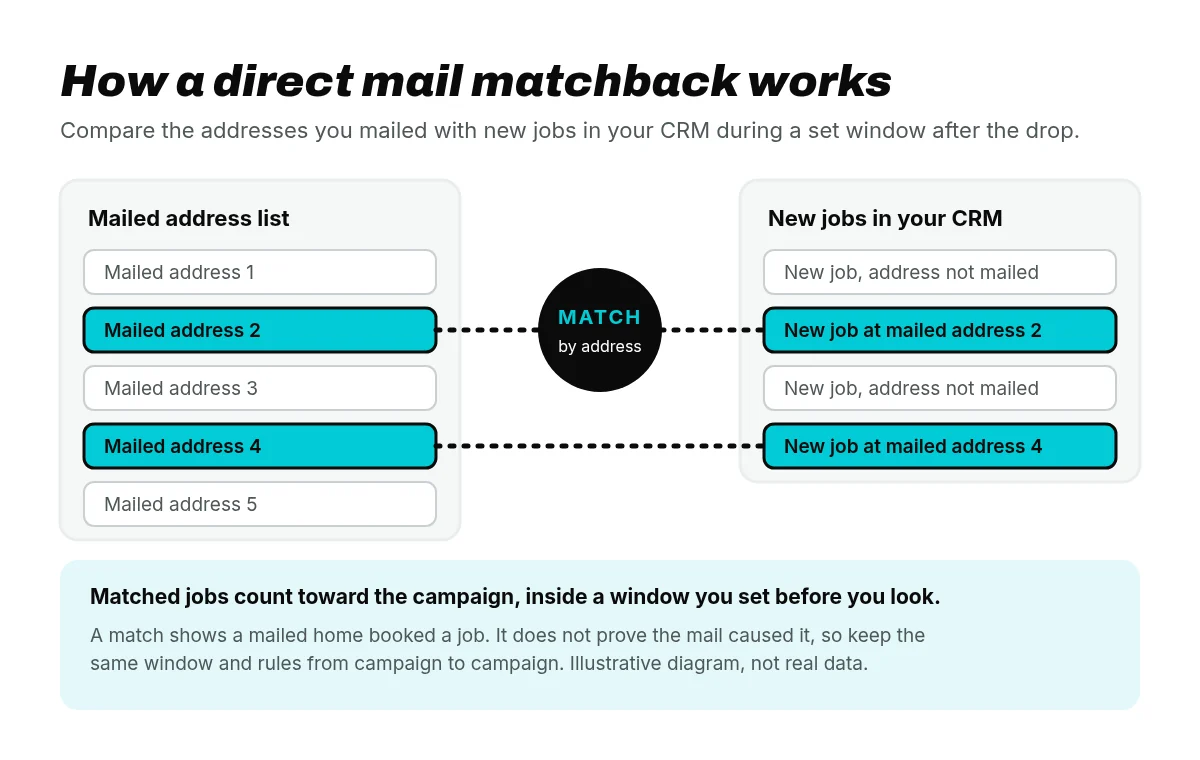
A matchback shows that a mailed home booked a job. It does not prove the mail caused it, so set the window before you look at results and be consistent from campaign to campaign.
Know when the mail actually landed. USPS Informed Visibility (IV-MTR) gives mailers near real-time tracking scans for barcoded letters and flats as they move through the mail stream, including delivery events (USPS PostalPro). Those scans tell you when a drop reached homes, which is a better start for your tracking window than the day it left the printer. Note that this tracks the mail, not the response.
Fix the leaks in your CRM. A matchback is only as good as your job records. Make sure every new job has a lead source field and a full service address. Common ways mail results get lost: callers use the main line instead of the tracked number, the office tags the wrong source, or the CRM has no lead source field at all.
Step 5: Report revenue and cost per booked job by campaign
A good direct mail report fits on one screen and answers one question: what did each mailing book, and what did each booked job cost?
Here are the columns we would put on it:
| Column | What it shows |
|---|---|
| Campaign and drop | Which mailing, and which drop of it |
| Pieces mailed | How many homes the drop reached |
| Calls | Calls to that campaign’s tracking number, plus QR scans |
| Booked jobs | Calls and matches that ended in a job on the schedule |
| Revenue | Invoiced revenue from those booked jobs |
| Cost per booked job | Total campaign spend divided by booked jobs |
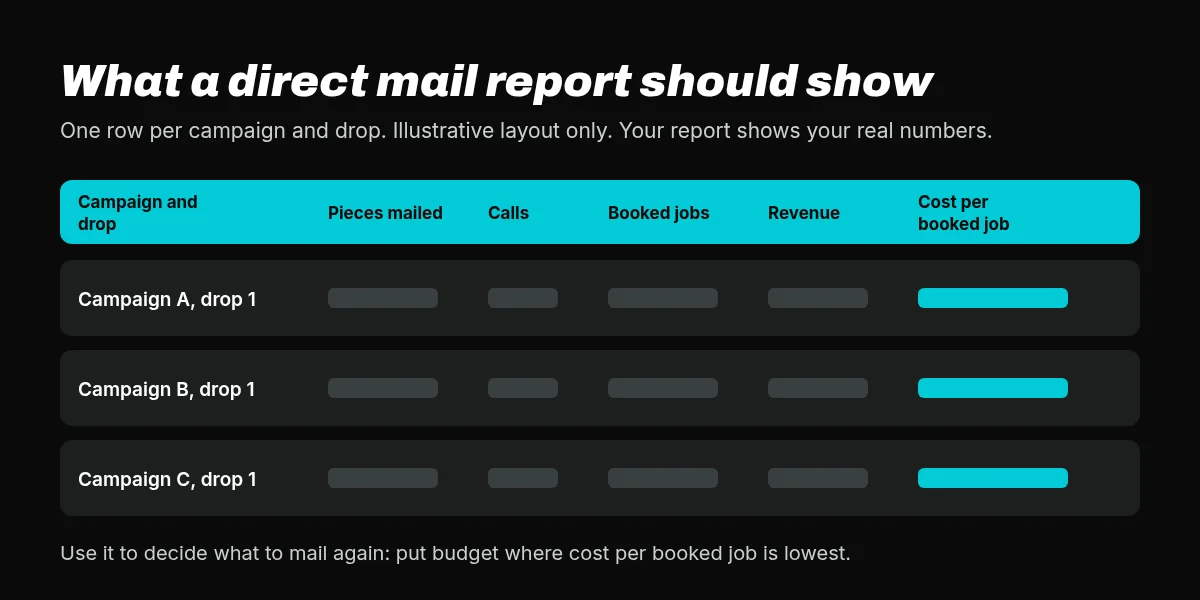
Read it with four questions:
- Which drop made the phone ring? Calls by campaign and drop week.
- Did those calls book? Calls matched to booked jobs and revenue in your CRM.
- What was it worth? Revenue from booked jobs, by campaign.
- What should I mail again? Cost per booked job, so you put budget where it works.
Cost per booked job is the number that ties tracking to budget. Use it to decide which campaigns earn another drop.
What is a good direct mail response rate for contractors?
Response rate is the number of responses divided by the number of pieces mailed. Direct mail response rates vary by program, list, offer, trade, season, and service area, so a single “good” number does not travel well from one contractor to another.
Response rate alone also misleads, for three reasons:
- It counts calls, not jobs. A mailing that makes the phone ring with price shoppers can have a strong response rate and a poor cost per booked job.
- It mixes in calls that are not new business. Existing customers, wrong numbers, and vendors all count as responses unless you tag them.
- It ignores the size of the job. Ten tune-ups and ten replacements are the same response rate and very different revenue.
That is why we measure booked jobs, revenue, and cost per booked job. Response rate is a useful early signal. It is not the result.
Can you track direct mail without a tracking number?
Yes, partly. Without a tracking number you have three other ways of tracking direct mail response. Each one is weaker on its own:
- Offer or promo codes. A code printed on the piece, asked for on the phone or a form. It only counts people who mention the code, and only when your team remembers to ask and write it down.
- “How did you hear about us?” Easy to add to your call script. It depends on memory. Someone who got your postcard, then searched your name, may simply say “Google.”
- Matchback. Mailed addresses compared to new jobs in your CRM. It catches people who never used a code or a tracking number, but it needs clean address data and a set window, and it cannot separate the mail from everything else that home saw.
Used together with a tracking number and a QR code, all three fill gaps. Used alone, each one leaves results on the table. Trackable direct mail starts with a number unique to the campaign.
How Mail Wins tracks every piece
Every Mail Wins campaign is tracked to calls, booked jobs, and revenue. Here is how our direct mail tracking works:
- Every piece gets a tracked call number unique to the campaign and drop.
- Where a piece carries a QR code, scans log to the same campaign.
- Calls are matched to booked jobs and revenue in your CRM.
- You see the results in your Mail Wins dashboard by campaign and drop: calls, booked jobs, revenue, and cost per booked job.
Tracking comes standard. Every Mail Wins direct mail program includes built-in tracking (tracked numbers, plus QR codes where they fit), and calls and jobs tie back to revenue in your Mail Wins dashboard. See how it works.
It works the same whether you run HVAC direct mail or direct mail for plumbers: the tracking and the CRM match are set up before the first piece drops.
Direct mail tracking FAQ
Does a QR code replace a tracking number?
No. Use both. Some people scan, and some pick up the phone. A QR code only counts scans, and a tracking number only counts calls. When a Mail Wins piece carries both, the tracked call number and the QR code point to the same campaign and drop, so calls and scans end up in one report.
How long after a drop should I track calls?
Keep tracking well after the drop lands, because calls and matched jobs can come in after the first days. Set your matchback window before you look at results, and use the same window from campaign to campaign. USPS does not guarantee delivery of USPS Marketing Mail within a specified time, so start the clock when the mail reaches homes, not when it leaves the printer.
Do I need a new number every campaign?
Yes. A number unique to each campaign, and ideally to each drop, is what lets you compare one mailing to another. Reuse a number and calls from different mailings blend together, so you cannot tell which one booked the work. Mail Wins gives every piece a tracked call number unique to the campaign and drop.
Does tracking work with radius marketing?
Yes. Radius marketing uses a targeted address list within a radius of a job or your office. Tracking works the same way: every Mail Wins piece has built-in tracking, such as a tracked call number and, where it fits, a QR code. Calls and jobs still tie back to revenue in your Mail Wins dashboard.
Which CRMs can you match to?
We match calls to booked jobs and revenue in your CRM, so your job records stay where they are. Mail Wins works with contractor CRMs such as ServiceTitan and Housecall Pro. On your consultation, tell us which CRM you use and we will confirm how the match works for your setup.